Thursday, March 22, 2012
sanjeev singh: life and me ( sanjeev singh)
sanjeev singh: life and me ( sanjeev singh): “In life it’s our choice whether we laugh or cry – and I chose to laugh” “It’s like when you fall in love – you can’t control it. You kno...


life and me ( sanjeev singh)
“In life it’s our choice whether we laugh or cry – and I chose to laugh”
“It’s like when you fall in love – you can’t control it. You know it might hurt you, …but the feeling is so good”
“It’s like when you fall in love – you can’t control it. You know it might hurt you, …but the feeling is so good”
Life is beautiful, its just how you really see it. Just choose your path, a burning dream and faith that yes you can do it!.
sanjeev singh: I BELIEVE I CAN FLY ( sanjeev singh)
sanjeev singh: I BELIEVE I CAN FLY ( sanjeev singh): I Believe I can Fly ( flight of the frenchies). .
Wednesday, March 21, 2012
sanjeev singh: humne tumko dekha (lyrics)
sanjeev singh: humne tumko dekha (lyrics): Hamne tumko dekha, tumne hamko dekha aisey hum tum sanam, saathon janam miltey rahey ho jaisey Oho hamney tumko dekha Ankhon ka rahey r...
humne tumko dekha (lyrics)
Hamne tumko dekha, tumne hamko dekha aisey
hum tum sanam, saathon janam
miltey rahey ho jaisey
Oho hamney tumko dekha
Ankhon ka rahey rahey ke milna, milke jhook jana
kar dehti hai yehi adayen dil ko diwana
hua yun saamna, pada dil thamna
oho hamne tumko dekha, tumne humko dekha aisey
Bastey bastey bas jayegi is dil ki basti
tab hi jeevan me ayegi pyar bhari masti
hamari dastaan kahega yeh jahan
Oho hamne tumko dekha, tumne humko dekha aisey
hum tum sanam, saathon janam, miltey rahey ho jaisey
la la la la la la
hum tum sanam, saathon janam
miltey rahey ho jaisey
Oho hamney tumko dekha
Ankhon ka rahey rahey ke milna, milke jhook jana
kar dehti hai yehi adayen dil ko diwana
hua yun saamna, pada dil thamna
oho hamne tumko dekha, tumne humko dekha aisey
Bastey bastey bas jayegi is dil ki basti
tab hi jeevan me ayegi pyar bhari masti
hamari dastaan kahega yeh jahan
Oho hamne tumko dekha, tumne humko dekha aisey
hum tum sanam, saathon janam, miltey rahey ho jaisey
la la la la la la


Friday, March 9, 2012

Thursday, March 8, 2012
BEST OF LOVE QUOTES
| " It's easy to say, 'I love you,' to someone, but it's more meaningful to thank someone for loving you." |
------------------------------------------------------------------------------------- | |
| " The grand essentials of happiness are: something to do, something to love, and something to hope for." | |
------------------------------------------------------------------------------------- | |
| " I love you for everything that you say and do. I love you for the happiness I feel when you are beside me. I love you because when you are near, the whole world is meaningful." | |
------------------------------------------------------------------------------------- | |
| " The spaces between your fingers were created so that another's could fill them in." | |
------------------------------------------------------------------------------------- | |
| " I don't want to live-- I want to love first, And live incidentally." | |
------------------------------------------------------------------------------------- | |
| " Love is something eternal, The aspect may change, But not the essence." | |
------------------------------------------------------------------------------------- | |
| " When travelling the path of life, and finding love along the way, Everything looks new and different. Little do you know it is the same old landscape you used to see all of the time; Love has just given you new eyes.” | |
------------------------------------------------------------------------------------- | |
| " Love is a hidden fire, A pleasant sore, A delicious poison, A delectable pain, An agreeable torment, A sweet and throbbing wound, A gentle death." | |
------------------------------------------------------------------------------------- | |
| " Love gives life meaning to live.” | |
------------------------------------------------------------------------------------- | |
| " A man falls in LOVE through his eyes, a women through her ears.” sanjeev singh | |
LYRICS
In ansoonon se kisko kya hua hansil
Mana kehna hai asan nibhana hai mushkil
Phir bhi ae yaar mere
Sunle meri intezaaa
Bhool ja Jo hua use bhool ja hai kasam tujhe muskura
khud ko na de yun saza
Un yadon ko bhool ja Wo to nahin tha teri wafon ke kabhil
Jane kya soch kar tune de diya apna dil
Is baar dil ka sauda karna na yun bewajhah
Bhool ja Jo hua use bhool ja
Hai kasam tujhe muskura
Khud ko na de yun saza un yadon ko bhool ja
Teri zindagi teri hai kisi ki amant nahin
Jab chahe tod de aese ek imart nahin
Is baar dil ka suda karna na yun bewahja
Bhool ja Jo hua use bhool ja hai kasam tujhe muskura
khud ko na de yun saza un yadon ko bhool ja
Lyrics www.allthelyrics.com/lyrics/shaan/
Jo hua use bhool ja hai kasam tujhe muskura
khud ko yiun na de tu saza un yadon ko tu bhool ja...
na nana bhool ja....
Khud ko yun na de tu saza
Un yadon ko tu bhool ja...
Mana kehna hai asan nibhana hai mushkil
Phir bhi ae yaar mere
Sunle meri intezaaa
Bhool ja Jo hua use bhool ja hai kasam tujhe muskura
khud ko na de yun saza
Un yadon ko bhool ja Wo to nahin tha teri wafon ke kabhil
Jane kya soch kar tune de diya apna dil
Is baar dil ka sauda karna na yun bewajhah
Bhool ja Jo hua use bhool ja
Hai kasam tujhe muskura
Khud ko na de yun saza un yadon ko bhool ja
Teri zindagi teri hai kisi ki amant nahin
Jab chahe tod de aese ek imart nahin
Is baar dil ka suda karna na yun bewahja
Bhool ja Jo hua use bhool ja hai kasam tujhe muskura
khud ko na de yun saza un yadon ko bhool ja
Lyrics www.allthelyrics.com/lyrics/shaan/
Jo hua use bhool ja hai kasam tujhe muskura
khud ko yiun na de tu saza un yadon ko tu bhool ja...
na nana bhool ja....
Khud ko yun na de tu saza
Un yadon ko tu bhool ja...
Sunday, February 26, 2012
World's Most Expensive Cars:
World's Most Expensive Cars: (By sanjeev singh)
1. Bugatti Veyron Super Sports $2,400,000. This is by far the most expensive street legal car available on the market today (the base Veyron costs $1,700,000). It is the fastest accelerating car reaching 0-60 in 2.5 seconds. It is also the fastest street legal car when tested again on July 10, 2010 with the 2010 Super Sport Version reaching a top speed of 267 mph. When competing against the Bugatti Veyron, you better be prepared!

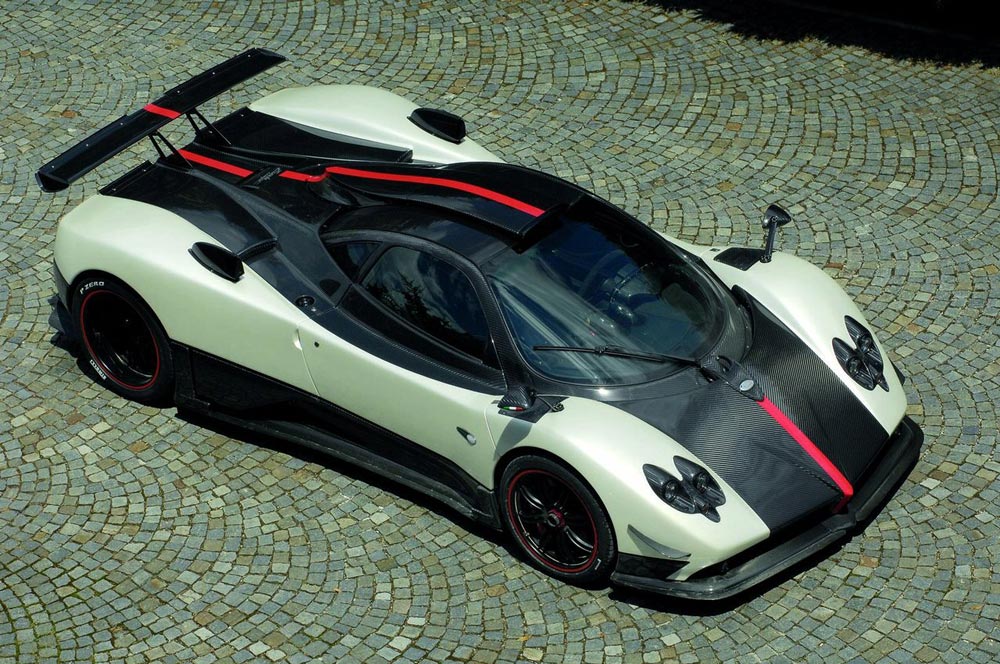
2. Pagani Zonda Clinque Roadster $1,850,000. One of the most exotic cars out there is one of the most expensive. It can go from 0-60 in 3.4 seconds with a top speed of 217 mph.
We have a tie for 3rd place:
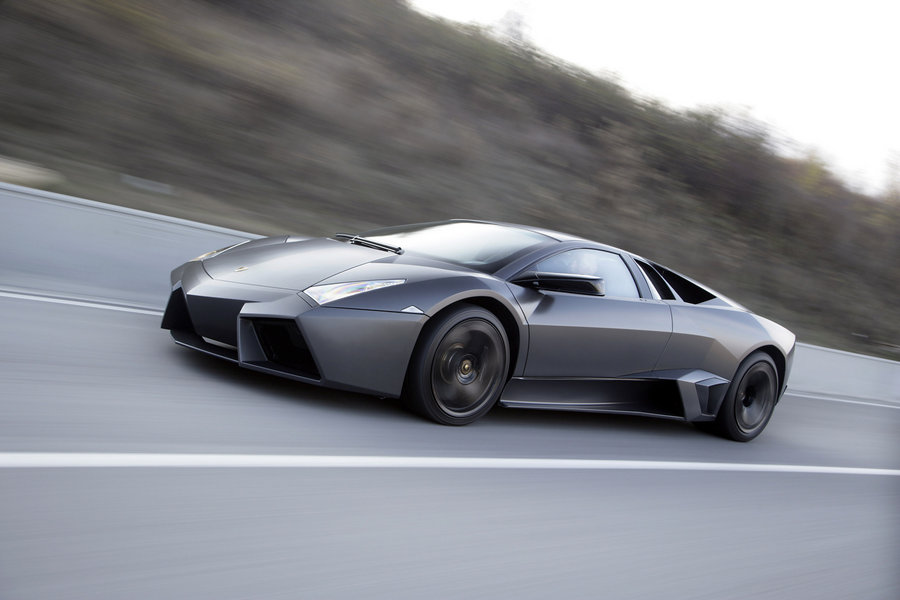
3. Lamborghini Reventon $1,600,000. The most powerful and the most expensive Lamborghini ever built is the third on the list. It takes 3.3 seconds to reach 60 mph and it has a top speed of 211 mph. Its rarity (limited to 20) and slick design are the reasons why it is so expensive and costly to own.

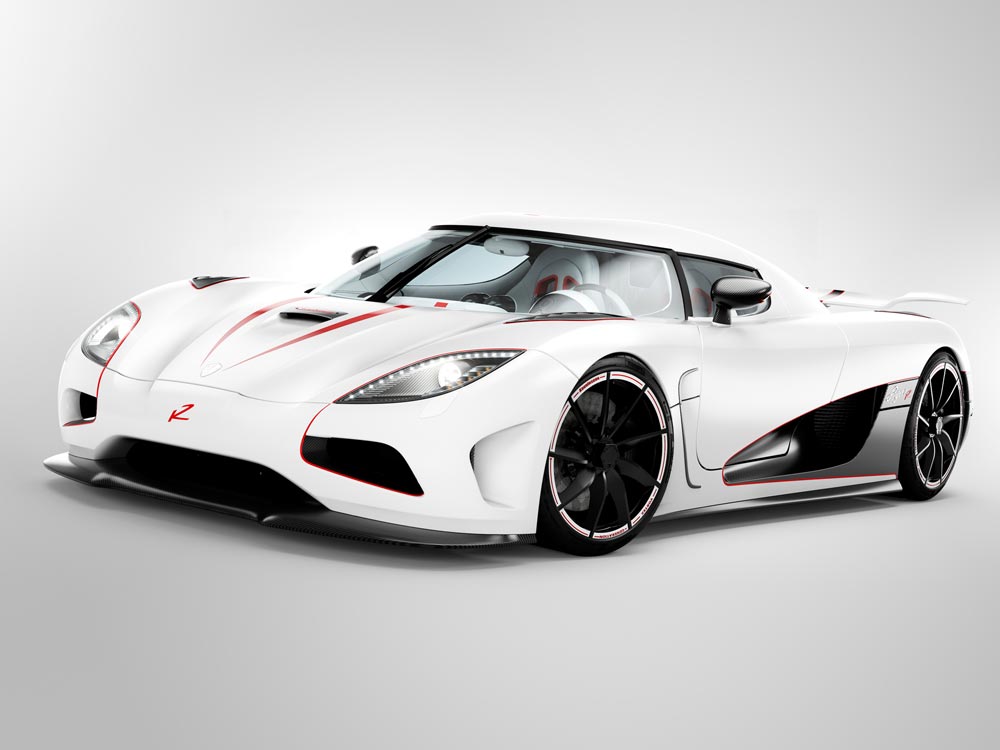
3. Koenigsegg Agera R $1,600,000. The Agera R can burn 0-60 in 2.8 seconds, reaching a maximum speed of 260 mph. It has the parts to reach 270 mph, but the supercar is electronically capped at 235 mph. With the completion of certain paperwork, the company will unlock the speed limit for one occasion.
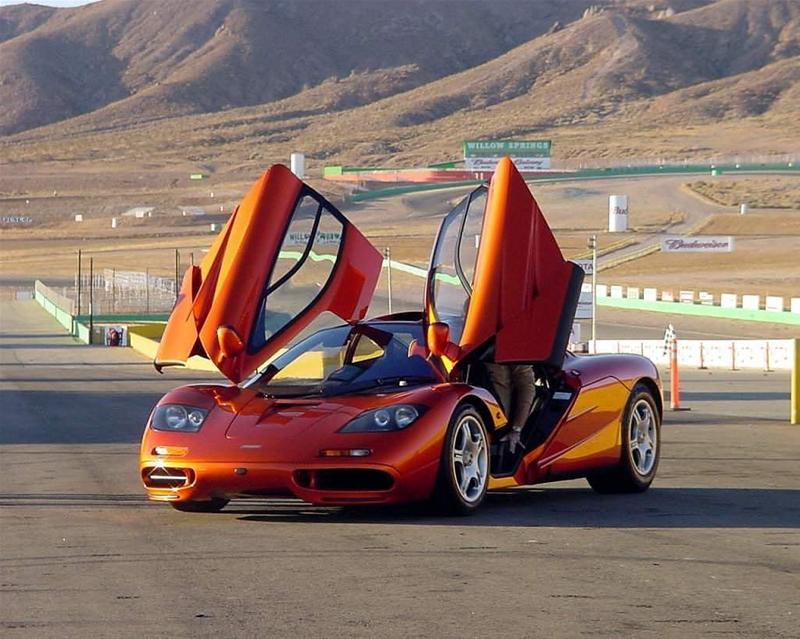
4. McLaren F1 $970,000. In 1994, the McLaren F1 was the fastest and most expensive car. Even though it was built 15 years ago, it has an unbelievable top speed of 240 mph and reaching 60 mph in 3.2 seconds. Even today, the McLaren F1 is still top on the list and outperforms many other supercars.

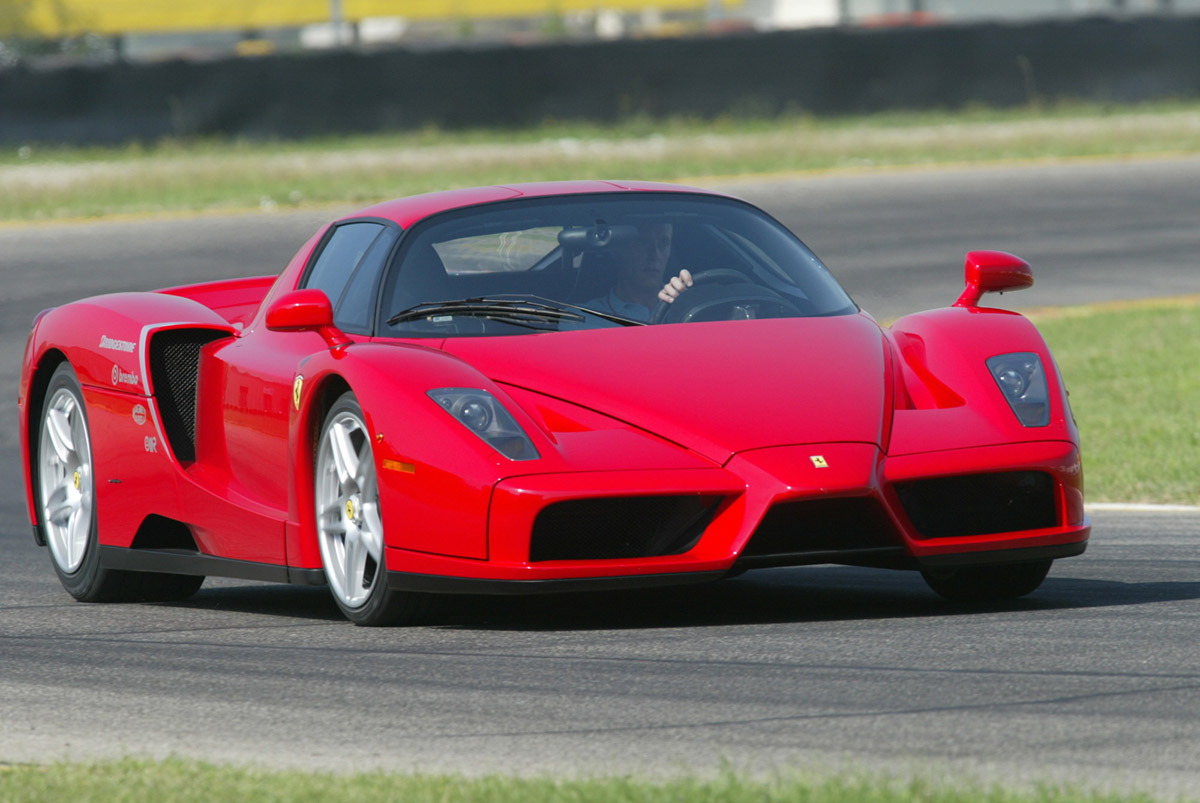
5. Ferrari Enzo $670,000. The most popular supercar ever built. The Enzo has a top speed of 217 mph and reaching 60 mph in 3.4 seconds. Only 400 units were produced and it is currently being sold for over $1,000,000 at auctions.

6. Pagani Zonda C12 F $667,321. Produced by a small independent company in Italy, the Pagani Zonda C12 F is the 6th most expensive car in the world. It promises to delivery a top speed of 215 mph+ and it can reach 0-60 in 3.5 seconds.

7. SSC Ultimate Aero $654,400. Don't let the price tag fool you, the 7th most expensive car is actually the 3rd fastest street legal car in the world with a top speed of 257 mph+ and reaching 0-60 in 2.7 seconds. This baby cost less than half as much as the Bugatti Veyron, yet has enough power to compete against the most expensive car. It is estimated that only 25 of this exact model will ever be produced.

8. Ascari A10 $650,000. This badboy can reach a tested top speed of 215 mph, zooming 0-60 in 2.8 seconds. The British car company plans to assemple 50 of these supercars in their factory in Banbury, England.
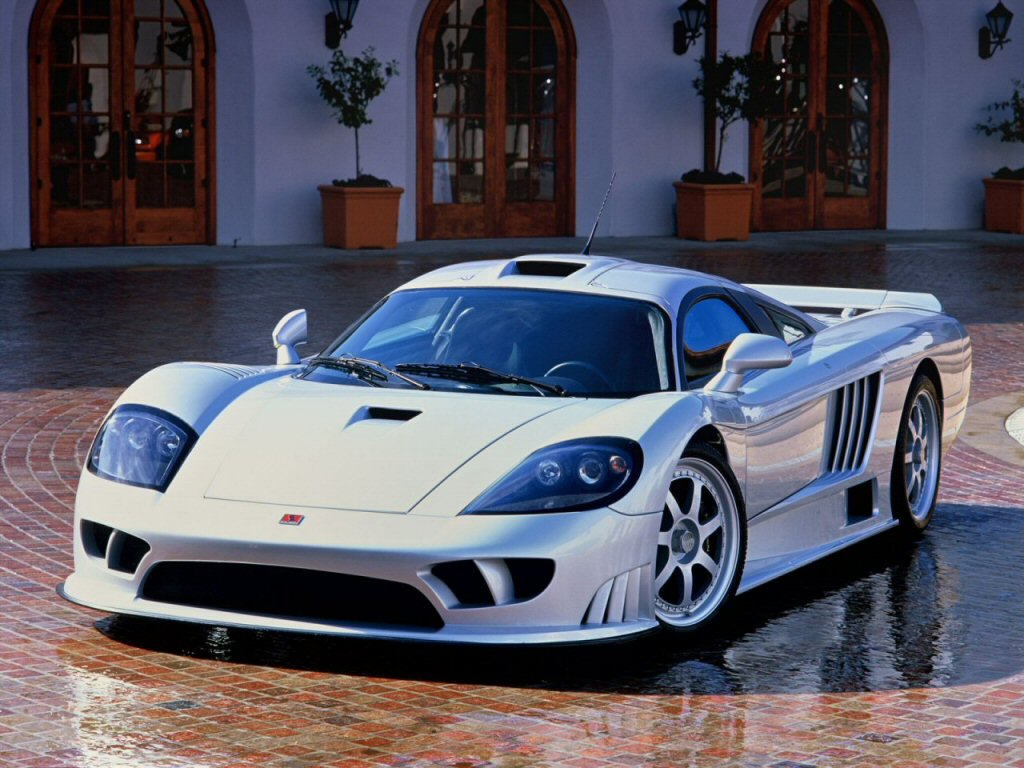
9. Saleen S7 Twin Turbo $555,000. The first true American production certified supercar, this cowboy is also rank 4th for the fastest car in the world. It has a top speed of 248 mph+ and it can reach 0-60 in 3.2 seconds. If you are a true American patriot, you can be proud to show off this car.

10. Koenigsegg CCX $545,568. Swedish made, the Koenigsegg is fighting hard to become the fastest car in the world. Currently, it is the 5th fastest car in the world with a top speed of 245 mph+, the car manufacture Koenigsegg has just released the Koenigsegg Agera R to compete against the Bugatti Veyron. The company is a tough contender and will continue to try and produce the fastest car in the world. Good luck with that!
1. Bugatti Veyron Super Sports $2,400,000. This is by far the most expensive street legal car available on the market today (the base Veyron costs $1,700,000). It is the fastest accelerating car reaching 0-60 in 2.5 seconds. It is also the fastest street legal car when tested again on July 10, 2010 with the 2010 Super Sport Version reaching a top speed of 267 mph. When competing against the Bugatti Veyron, you better be prepared!

2. Pagani Zonda Clinque Roadster $1,850,000. One of the most exotic cars out there is one of the most expensive. It can go from 0-60 in 3.4 seconds with a top speed of 217 mph.
We have a tie for 3rd place:
3. Lamborghini Reventon $1,600,000. The most powerful and the most expensive Lamborghini ever built is the third on the list. It takes 3.3 seconds to reach 60 mph and it has a top speed of 211 mph. Its rarity (limited to 20) and slick design are the reasons why it is so expensive and costly to own.
3. Koenigsegg Agera R $1,600,000. The Agera R can burn 0-60 in 2.8 seconds, reaching a maximum speed of 260 mph. It has the parts to reach 270 mph, but the supercar is electronically capped at 235 mph. With the completion of certain paperwork, the company will unlock the speed limit for one occasion.
4. McLaren F1 $970,000. In 1994, the McLaren F1 was the fastest and most expensive car. Even though it was built 15 years ago, it has an unbelievable top speed of 240 mph and reaching 60 mph in 3.2 seconds. Even today, the McLaren F1 is still top on the list and outperforms many other supercars.
5. Ferrari Enzo $670,000. The most popular supercar ever built. The Enzo has a top speed of 217 mph and reaching 60 mph in 3.4 seconds. Only 400 units were produced and it is currently being sold for over $1,000,000 at auctions.
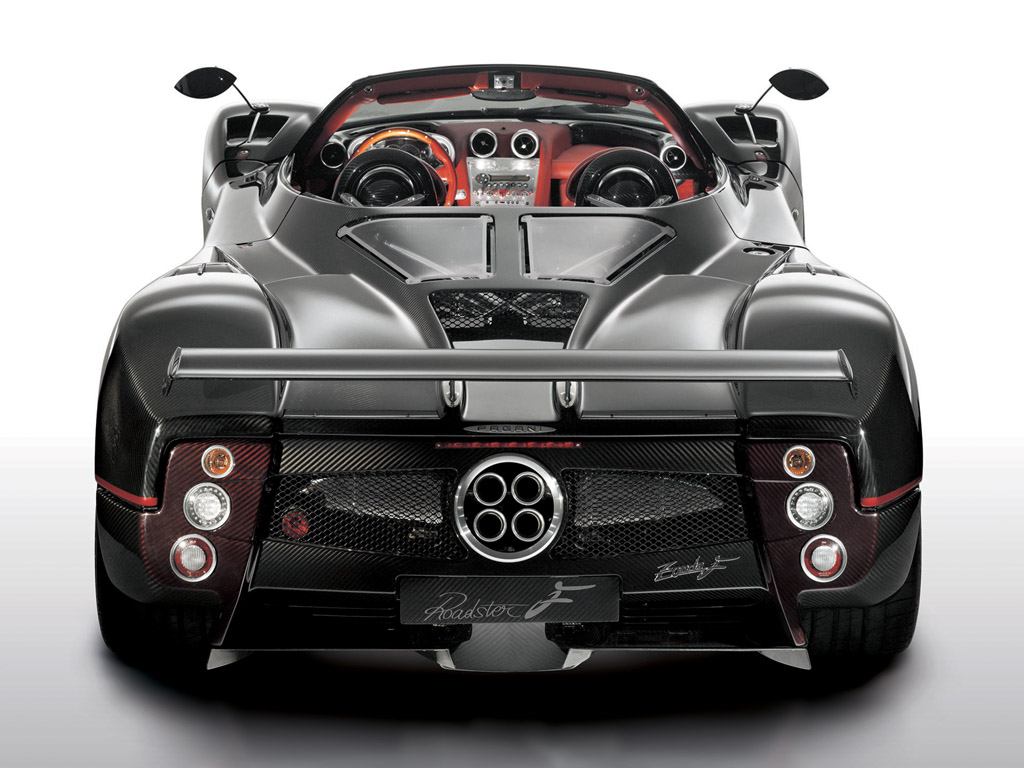
6. Pagani Zonda C12 F $667,321. Produced by a small independent company in Italy, the Pagani Zonda C12 F is the 6th most expensive car in the world. It promises to delivery a top speed of 215 mph+ and it can reach 0-60 in 3.5 seconds.
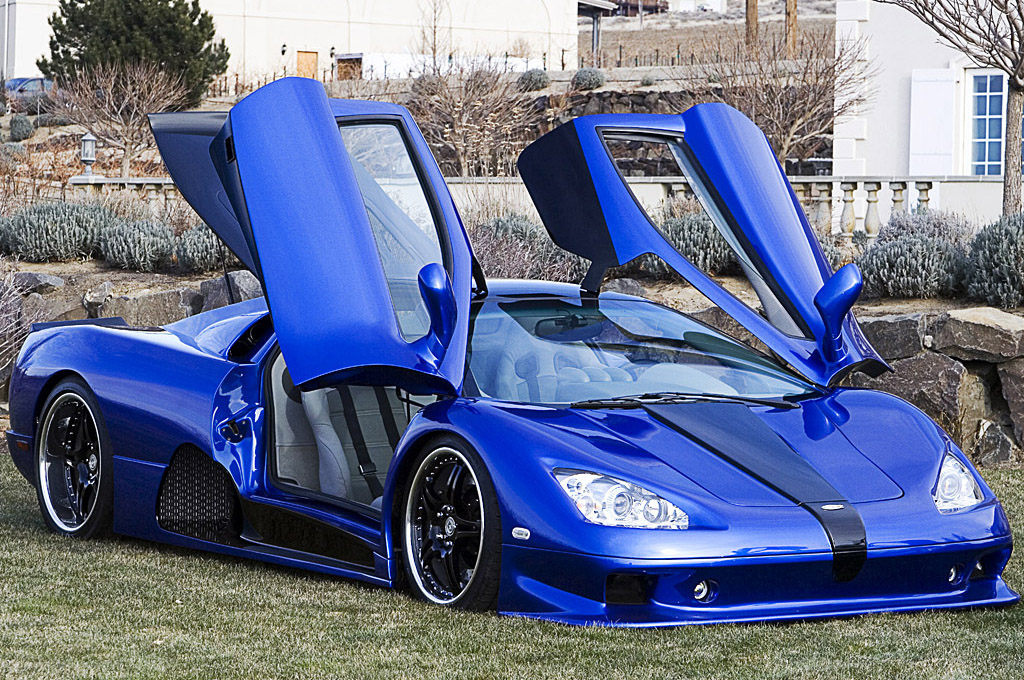
7. SSC Ultimate Aero $654,400. Don't let the price tag fool you, the 7th most expensive car is actually the 3rd fastest street legal car in the world with a top speed of 257 mph+ and reaching 0-60 in 2.7 seconds. This baby cost less than half as much as the Bugatti Veyron, yet has enough power to compete against the most expensive car. It is estimated that only 25 of this exact model will ever be produced.
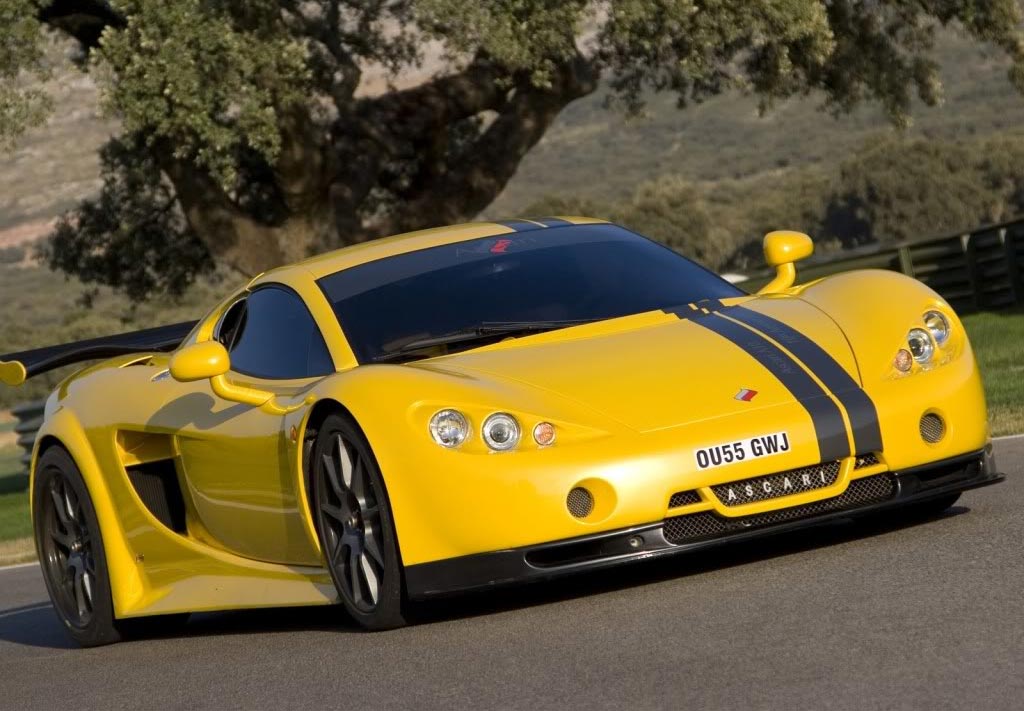
8. Ascari A10 $650,000. This badboy can reach a tested top speed of 215 mph, zooming 0-60 in 2.8 seconds. The British car company plans to assemple 50 of these supercars in their factory in Banbury, England.
9. Saleen S7 Twin Turbo $555,000. The first true American production certified supercar, this cowboy is also rank 4th for the fastest car in the world. It has a top speed of 248 mph+ and it can reach 0-60 in 3.2 seconds. If you are a true American patriot, you can be proud to show off this car.
10. Koenigsegg CCX $545,568. Swedish made, the Koenigsegg is fighting hard to become the fastest car in the world. Currently, it is the 5th fastest car in the world with a top speed of 245 mph+, the car manufacture Koenigsegg has just released the Koenigsegg Agera R to compete against the Bugatti Veyron. The company is a tough contender and will continue to try and produce the fastest car in the world. Good luck with that!
Saturday, February 18, 2012
friends
let
“me‚
show
you..
the
best picture..
in
the world..
()‚‚() ()‚()
( ,o ) ( o,)
(,) (,) (,) (,)
=hum tum=
friends.
“me‚
show
you..
the
best picture..
in
the world..
()‚‚() ()‚()
( ,o ) ( o,)
(,) (,) (,) (,)
=hum tum=
friends.
Introduction to Computer
Introduction to Computer
What is Computer?
Computer is a device that performs mathematical and logical operations based on the database with a minimal human interpretation.
It is devices that accepts data, processes and store these, and produces a result/output.
Four Basic Functions
1.Input
2.Process
3.Storage
4.Output
Typically, a computer system consists:
1.Input Devices – which allows the users to input data for processing
2.Storage Devices – where the processed information are stored
3.Central Processing Unit – which interprets and executes data or instruction
4.Output Devices – where outcomes are displayed
Three Main Elements of Computer System
1.HARDWARE – refers to the physical components of a computer that you can actually touch, such as keyboard, monitor, central processing unit, mouse and printer.
HARDWARE may be classified into:
1. Input Devices – these are external devices that provide information and instruction to the computer.
Common Example: Keyboard,Touch tone device, mouse, joystick, touch screen, light pen, scanning device, Fax Machine, phone card, digital cameras, sensor
2. Output Devices – these are devices that will communicate the result of processing back to the user by converting electrical signals from the Arithmetic/Logic Unit. Output devices that will produce result/output.
Common Example: monitors, Printer, Plotter, speakers
3. Central Processing Unit (CPU) – performs arithmetic and logical operations on data taken from the primary storage or on information entered through any input devices.
Five basic component of CPU:
1. Main Storage – also called memory/primary storage where instructions and data are stored while processing is done.
Two types of memory inside the main storage:
Random Access Memory (RAM) uses to store given instructions which can later be changed or erased. When data are loaded from the RAM it means WRITING data, when data are accessed it means READING data.
All information stored in it are lost or erased when the computer power is turned off or interrupted. This kind of memory is volatile.
Read Only Memory (ROM) contains stored instructions that a computer requires to be able to do its basic routine operations. The instructions still hold even when there is power interruption or shut-off. This kind of memory are non-volatile. It has a data built in by the manufacturer.
2. REGISTERS – part of the CPU that function as fast-accessed temporary memory locations. The bits of information taken from the main memory and those that will be placed in the main memory are temporarily held in the registers while computation are being performed.
3. BUSES – are bundles of tiny wires that serve as the communication path between components of the CPU. The Three most important buses are the Address, Data and Control Buses.
4. Arithmetic Logic Unit (ALU) – performs all the arithmetic and logical calculations of the CPU.
5. CONTROL UNIT (CU) – is responsible for directing the flow of instructions and data within the CPU. It fetches the instructions from the main memory for execution in the CPU. Aside from controlling the input and output devices, it also passes data to the ALU for computation.
4. SECONDARY STORAGE – where data are stored permanently.
Common example hard disk, optical disk (compact disk read only memory (CD), digital versatile disk (DVD)
Two Classes of Secondary Storage:
1. Direct Access Media – (floppy disk, flash memory(usb)) supports sequential of random access where data can be accessed directly)
2. Sequential Access Media – where data are accessed in a specific order. (magnetic tape – traditional medium for long term storage but slowest in terms of retrieval of data)
2.SOFTWARE – is untouchable. It is a set of instructions used to direct the hardware on how to turn data into useful information for people to use.
A set of instructions or program that tells the computer how to do a specific task.
Two types of Software:
1.SYSTEM SOFTWARE – refers to computer programs of library files whose purpose is to help run the computer system.
Example – Operating System (manage the whole operation of the computer), output devices (provides interface to the hardware) Utility Programs (who manage files), Compilers and interpreters (programs that will translate high-level language programs into object code)
2.APPLICATION SOFTWARE – performs specific functions, which make daily activities easier and facilitate the performance of work efficiently and effectively.
Categories of Application Software:
1.Productivity Tools – eg. Software like Word Processing, Spreadsheet, Database, Presentation Graphics, Personal Information Manager Software and Project Management.
2.Graphics and Multimedia –eg. Software like Computer-Aided Design, Desktop Publishing, Web Page Design, Image Editing, Video/Audio Editing, Multimedia Authoring
3.Home, Personal and Educational Use – eg. Software like Integrated software, Personal Finance software, Clip Art/Image Gallery, Legal Software, Educational Software, Entertainment Software.
4.Communications – eg. Software like E-mail Software, Web Browser, Chat client Software, Newsreader Software, Instant Messenger software, Groupware software, Videoconference software.
Three basic types of application software:
1.COMMERCIAL – comes prepackage and is available from software vendors. It must be purchased.
2.SHAREWARE – are software develop a d released as demonstration versions of their commercial product. Each demonstration copy has an expiration date which gives the user ample time to evaluate and decide whether the purchase the product or not.
3.OPEN SOURCE – software that is created by generous programmers and released to the public domain for free and for public use.
3.PEOPLEWARE – who use the computer system, they are the most important factor in a computer system because they manipulate and program the computer system to make it useful.
- The skilled workers in the Information Technology field.
The major compositions of IT Professionals:
1.Management Group – eg. Computer System Manager
2.Systems and Procedures Group – Computer Scientist, Computer Engineer, System Analyst
3.Programming Group – Computer Programmer
4.Computer Operations Group - Computer Operator, Data Encoder, Data Entry Operator, Computer Librarian
CAPABILITIES OF COMPUTER
1.Computer can do repetitive and routine work.
2.Computer can process large amount of data.
3.Computers are reliable and accurate.
4.Computer can store and retrieve large amount of information.
5.Computers have a self-checking ability.
6.Computer can be self-operating.
7.Computers can do remote processing.
LIMITATIONS OF COMPUTER
1.Computers are dependent on instruction and data.
2.Computers cannot generate information.
3.Computers cannot correct wrong instructions.
4.Computers cannot decide specific task. (except if they are programmed)
5.Computers are vulnerable to a virus attack.
Thursday, February 16, 2012
How to make Windows 7 Bootable USB Pendrive
Hello,
Many of us face a lot of problem when we have to reinstall windows on our computer or laptop. First thing we have to decide from where to install windows? The options available are DVD or USB Pendrive. In the latest new netbooks, mostly there is no DVD drive. So if you want to install windows you have to go with the other option, i.e. USB Pendrive. So here I give a brief and 100% tested tutorial on how to create a Windows 7 Bootable USB Pendrive to install Windows 7 from USB Pendrive.
First thing, you should check whether your BIOS supports booting from USB. Most of the computer/laptops support. But if your BIOS doesn’t, then sorry, you cannot boot from a USB Pendrive.
Second thing, you need another computer with Windows installed with a DVD drive, to copy its contents later.
So let us start with the procedure now:
1) Run command prompt (cmd). This can be done by clicking start and typing typing cmd in Windows 7. In Windows Xp, click on start and then click on run. Type cmd and run. This will open the command prompt which will look like this:

2) Then run diskpart utility from command prompt, by typing ‘diskpart’ on command prompt and pressing enter. This will run the diskpart utility in a separate windows, which is shown in 2nd picture below:


3) Now put in your pendrive in a USB port. Your pen drive must be atleast 4 GB, 8 GB pendrive is best for this purpose. Now go back to the diskpart console and type ‘listdisk’ and press enter. This will list the various storage devices available. You can see the size column of the disk and here we can see that ‘disk 2′ is our pen drive. Warning: In your computer it may be some other number. In our case it is ‘disk 2′.

4) Then you have to type ‘select disk 2′ and press enter. Note: in our case it is disk 2, in your case it may be disk 3, or disk 1 or any other number. You can enter ‘detail disk’ to see the details of the disk after selecting it to verify that you have selected the correct disk. You can see these steps in the image below:

5) Then you have to run a series of commands. The commands to be run in the order are:- clean
- create partition primary
- select partition 1
- active
- format fs=fat32
These steps are shown in the image below:

6) The format step will take some time. You can have a tea or coffee in the meantime and come back. After the format is complete you have to run ‘assign’ command. And after this you can exit diskpart utility by entering the ‘exit’ command. The steps are shown below:
- assign
- exit

- The image below shows all the steps taken from the first step:- create partition primary
- select partition 1
- active
- format fs=fat32
These steps are shown in the image below:

6) The format step will take some time. You can have a tea or coffee in the meantime and come back. After the format is complete you have to run ‘assign’ command. And after this you can exit diskpart utility by entering the ‘exit’ command. The steps are shown below:
- assign
- exit


7) After the format is complete, put in your original Windows 7 DVD in your DVD drive, or if you have an .iso image of the DVD, mount that image using any virtual drive software like Power ISO.
- Now go to My Computer, and open the contents of DVD Drive. Press ‘ctrl+a’ to select all contents and copy all the contents by pressing ‘ctrl+c’.
- Now go back to My Computer and open the USB Drive and press ‘ctrl+v’ to paste all the contents of DVD into the USB Disk.
 When the copy finishes, you are done just remove the USB Drive safely and use it to install Windows 7 in your computer/laptop.
Thanks
sanjeev singh
Wednesday, February 15, 2012
Tuesday, February 14, 2012
unfriend

Not too long ago I was treated to something that would likely never happen to me in real life, I was unfriended. Thanks to Facebook someone was able to say to me in one simple click of the mouse: I don't want to be your friend anymore. The feeling was mutual so I wasn't upset that this person did what they did but it made me think. We are all raised by our parents to accept people for who they are no matter how much we dislike them or disagree with what they believe; to tell someone to their face that you don't want anything to do with them is socially unacceptable. I have to admit I did do such a thing once upon a time, it was in my first year of high school and I told this guy who was unbelievably annoying that I didn't want to be his friend anymore. I don't regret doing it but in hindsight it was altogether unnecessary, he didn't deserve it and I'm sure he felt like shit afterwards. Now here we are today and Facebook has taken the same principle and put it in the aptly named "unfriend" button. Theoretically I could've stayed friends with that guy in high school, waited until Facebook came along, added him to my "friends" and then shortly after clicked that "unfriend" button. Simple, painless and effective.
Ultimately I suppose the question is, when do people start using this "unfriend" technique more rampantly in real life? It's a byproduct of this day and age for us to use popular internet ideas in our everyday actions and speech (OMG for instance) so it doesn't seem unreasonable to believe that eventually "unfriend" could be the next craze. Facebook is an ironic kind of thing in that we add and add to this "friend" total yet don't ever have anything to do with a vast majority of these people. We've already diluted the meaning of the word friend so why not further adulterate it by introducing "unfriend"?
Saturday, February 11, 2012


MICROSOFT FACTS'
1. “Micro-soft’s” First Ever Mention

The first ever mention of “Microsoft” was in a letter from Bill Gates to co-founder Paul Allen in 1975. Gates initially wrote the company name as Micro-soft, which made sense considering it’s a portmanteau of “microcomputer” and “software.”
Losing the hyphen, “Microsoft” was officially registered as a company in November, 1976 in New Mexico where Gates and Allen were working with their first major customer, MITS. Microsoft didn’t move to its current campus in Redmond, Washington until 1986.
The Microsoft logo has changed several times over the years, the current “Pac-Man” logo was introduced in 1987, but previous to that was the “blibbet” logo that’s pictured above. The “blibbet” refers to the stylized “o” and was apparently once the name of a burger served in the Microsoft company cafeteria.
2. Brian Eno Composed “The Microsoft Sound”
Pioneering musician Brian Eno was the musical brains behind Window 95′s start up tune, dubbed “The Microsoft Sound.”
The influential musician, who has worked with the likes of David Bowie and U2, told the San Francisco Chronicle that making such a short piece of music was “funny” and “amazing.” Eno likened the process to “making a tiny little jewel.”
Other musical trivia from the launch of Windows 95 is, of course, the use of The Rolling Stones “Start Me Up” in the ad campaign, while a related Eno fact is that he also composed the music for the computer game Spore.
3. Microsoft’s Fave Food Is Pizza
Although not quite at Google‘s level of snack-tastic, free-for-all wonder, Microsoft does offer free drinks. Over 23 million gratis beverages are downed on the corporate campus each year.
Apparently the top two drinks of choice for Microsoft staffers are milk and OJ. There’s also free candy on the Microsoft campus shuttle.
As far as food goes, Microsoft has around 35 cafeterias (one of which is pictured above) serving around 37,000 people each day. Pizza tops the list of most popular meal.
4. Microsoft Uses Codenames
Ever since the company’s first operating system, Microsoft has worked on its projects under codenames, of which Wikipedia has a long list. Apparently Gates was ready to launch Windows under the name “Interface Manager” before he was persuaded to change it by an employee.
Past codenames include “Longhorn,” “Lone Star,” and “Vienna.” While you might be tempted to add “Mojave,” to that list, it’s actually part of a Microsoft ad campaign. The “Mojave Experiment” was a marketing exercise that battled Vista’s poor PR by presenting the software to new users as a fresh product.
5. The Average “Softie”
The average Microsoft employee, or “Softie” as they call themselves, is a 38-year-old male with the average salary for a developer coming in at $106,000.
Microsoft currently employs 88,180 people who work across 32,404,796 square feet of Microsoft’s premises, over 50,000 of which are U.S.-based. The male to female ratio is very high among Microsoft’s American employees with a staggering 76% male workforce.
6. Microsoft Celebrates Anniversaries With M&Ms

All companies have their little in-house traditions, and Microsoft is no exception. It seems it’s customary for Softies to celebrate their yearly employment anniversaries with candy, and more specifically, M&Ms.
Each anniversary, a Microsoft employee is expected to provide one pound of M&Ms for every year they’ve worked. That means if Bill Gates observed the tradition, he should have turned up with 33 pounds of M&Ms on June 27, 2008.
7. Microsoft’s Stock Has Split Nine Times
Microsoft has split its stock nines times since it went public back in March 1986. Put very, very simply, a company will generally split its stock when its share price becomes too high.
Since Microsoft has had six 2-for-1 splits and three 3-for-1 splits, one original Microsoft share would now be equal to 288 shares today. Interestingly the price of Microsoft’s stock at its initial public offering was $21 a share, at the time of writing a share is now around the $23 mark. One original MSFT share would now be worth over $6,000.
8. Microsoft Has a Huge Art Collection
No, we’re not talking about Clip Art. Microsoft is one of the largest corporate collectors of artworks with over 5,000 contemporary pieces including painting, sculpture, works on paper, photographs, ceramics, studio glass, and multimedia works. Microsoft gathers arts from local artists, up-and-coming artists and big names such as Cindy Sherman, Chuck Close and Takashi Murakami.
A large proportion of the works are on display at more than 150 of Microsoft’s many campuses, as the company subscribes to the belief that art in the workplace reduces stress, increases productivity and encourages discussions and expression of opinions.
9. Microsoft Asks Strange Interview Questions
Microsoft has a reputation in the industry for asking off-beat, off-the-wall questions during its job interview. The most oft-quoted question is: “Why is a manhole cover round?” Whether this particular example is genuine, or an urban legend, it’s certainly true that Microsoft employs a very unusual, and forward-thinking interview process. It’s even rumored that companies like Google have since emulated the style.
Rather than plain “Where do you see yourself in five years” type questions, Microsoft is more likely to ask you to solve a logic puzzle or think through a problem like “Design a coffee maker that will be used by astronauts.” Obviously, Microsoft isn’t planning to go into the coffee-in-space industry anytime soon, but the process serves to find candidates that can think creatively.
10. Microsoft Holds Over 10,000 Patents
Microsoft holds over 10,000 patents and files around 3,000 every year, ranking as one of the top five patent owners in the U.S.
Although a large majority of the patents relate to obscure elements of software, the 5,000th and 10,000th were consumer-friendly, easily-understandable ideas. The 5,000th was for tech in Xbox 360 games that lets people “watch” a video game remotely, while the 10,000th was for the Microsoft Surface, linking real-life objects with data and images.
Microsoft also rewards its staff members for securing a new patent. Besides a $1,500 bonus, they get a wooden plaque and a decorative black “cube” that features their name, as well as the title and date of the patent.
BONUS: The Microsoft Campus is Full of Bunnies!
Our very own Jolie O’Dell found a great factoid about the Microsoft Corporate Campus, she gleaned while on a recent visit.
“So, back in the mists of time, some people dumped a bunch of rapidly reproducing pet bunnies — leftovers from kids’ Easter gifts — on a grassy knoll near the MSFT campus,” Jolie said. “The bunnies started doing what bunnies do best, that is, making more bunnies.
At one point, there were so many that MSFT staff had to start catching them and having them spayed and neutered! Nowadays, you’ll still see lots of rabbits hopping around, though. Way cuter than Google’s goats.”
It seems the bunny proliferation has been a long term issue. According to a 1998 Seattle Times article, the “Redmond rabbit problem” does not just affect Microsoft, but Nintendo, Eddie Bauer and other companies in the area.
The problem back then spawned the Redmond Rabbit Coalition group (many members of which are now involved in the current day Evergreen Rabbit Rescue) who campaign for a humane solution to the ongoing pest problem.
BY: SANJEEV KUMAR SINGH
Subscribe to:
Comments (Atom)